Migrate from Firebase to Supabase: Database, Storage and Passwords Kept
29 oktober 2026
In 2024 I wrote 5 things I wish I knew before starting with Firebase's Cloud Firestore. Tip number 3 was "It's okay to have duplication in your database". Tip number 4 was "It's also okay to have complicated write operations".
Well. Two years later I migrated that same application off Firestore. Completely.
Don't worry, those tips still hold. For Firestore. This article is about what happens when your app outgrows it.
1. Why I left Firestore
That Firestore article still holds: in Firestore, duplication is the right trade-off. But Kepp grew, and more and more data got connected to other data.
Data integrity
Firestore doesn't have foreign keys. Every relationship was a subcollection, an array of IDs, or a copy of another document, and keeping those in sync was all on me. The copies started to disagree: a file renamed in one place but not the other, a step pointing to a file deleted months ago, a createdBy with the email of a user that no longer exists.
Relational queries
"Which roles are responsible for which steps across all processes in this account, and which documents do they need?" is a few joins in SQL. In Firestore it meant collection group queries, fetching documents one by one, and stitching it together in code.
Authorization
Firestore security rules are a bad place to write authorization:
- They're a small custom language. No loops, no recursion, and they live in a file away from the rest of your code.
- They don't tell you what went wrong. A denial is just
permission denied, with no hint of which condition failed. - You write every check twice. The Admin SDK skips the rules, so server code needs its own checks.
- They can't look far. A rule can read at most 10 other documents per request. That's nowhere near enough once access is shared with groups and inherited from parent folders.
I moved authorization to relationship tuples in Postgres: one table and a recursive query.
2. The migration, phase by phase
When I started, I wrote a nice plan with seven phases: one-time backfill, dual writes to both databases, shadow reads that compare Firestore and Postgres results, gradually flipping reads, then flipping writes. Very textbook.
That's not what I ended up doing. I didn't need both databases to stay in sync at all. What I needed was migration scripts I could trust, and a quiet moment to run them. What actually happened looks more like this:
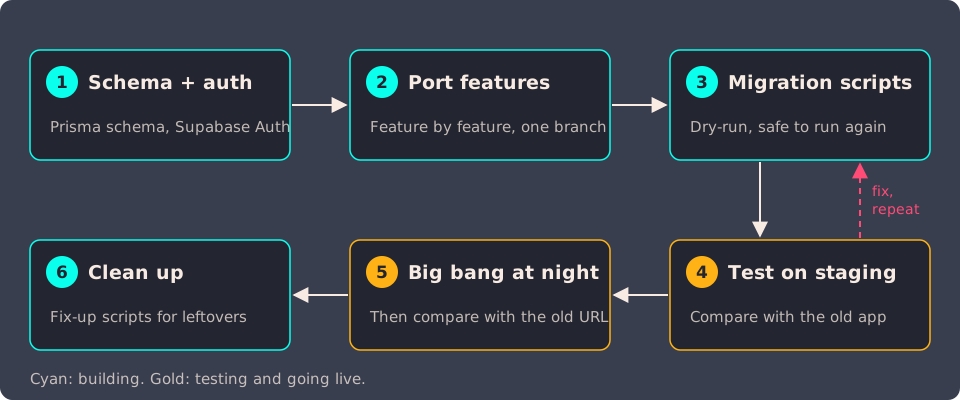
Phase 1: Schema and auth next to Firebase
I set up Supabase in the EU region, added Prisma, and designed a relational schema based on the Firestore structure. In the same branch I added Supabase Auth and a first version of the login flow.
Phase 2: Port feature by feature
On a long-lived branch I rewrote the app one feature at a time. On the client, the app used to query Firestore directly with the Firebase SDK. Now it calls API routes through TanStack Query, and those routes use Prisma to talk to Postgres. I kept the old Firestore queries around in separate files, so I could always look back at how something used to work.
This took about six weeks (December 2025 to mid January 2026) before the branch was merged.
Phase 3: Migration scripts, and rehearse them
The data itself moved with a set of scripts, one per entity, that ran in a strict order. Every script:
- supports
--dry-runand--verbose - writes a JSON log with created, updated, skipped and errored records
- is idempotent: running it twice updates instead of duplicating
That last one is the important one. I ran the full pipeline against dev and test environments over and over, fixing the scripts after every run, until a run came through clean.
Phase 4: Compare on staging
Before production got anywhere near the new version, we ran the full migration on a staging environment. Then we opened the new Supabase version on staging next to the old Firebase version, and compared them with our own eyes. Same documents? Same processes? Same steps in the same order?
The goal of this check was to test the migration scripts, not to keep two databases in sync. Staging was a snapshot. While we were comparing, customers kept working in the old app, so the two drifted apart. That didn't matter. What mattered was whether the scripts turned Firestore data into the right Postgres data. That's how we found most of the issues I describe in the pitfalls section, and every fix went back into the scripts for the next run.
Phase 5: One big bang at night, and compare again
Once the scripts did what they should on staging, we did one big-bang migration on production. No gradual rollout.
I ran it during the night, when nobody was using the app. No writes coming in, so every script could run from start to finish on a database that wasn't changing underneath it.
Afterwards we checked production for inconsistencies, the same way we did on staging. The trick that made this a lot less scary: we kept the old Firebase version of the app running on a different URL. So we could open production and the old version side by side and check that the real data had come over correctly.
We also checked that nobody had edited anything in Firestore while the migration ran. A change made after a script had already copied that data would never have reached Postgres, and it would have been lost without anyone noticing.
Phase 6: Clean up
After the cutover came a round of fix-up scripts (more on that later), and eventually removing the dead Firestore code. That turned out to be about 30 files and 4,000 lines that nothing imported anymore.
3. Hierarchical to relational: how did I map?
This is the part I spent the most time thinking about. Here's how the Firestore structure maps to Postgres:
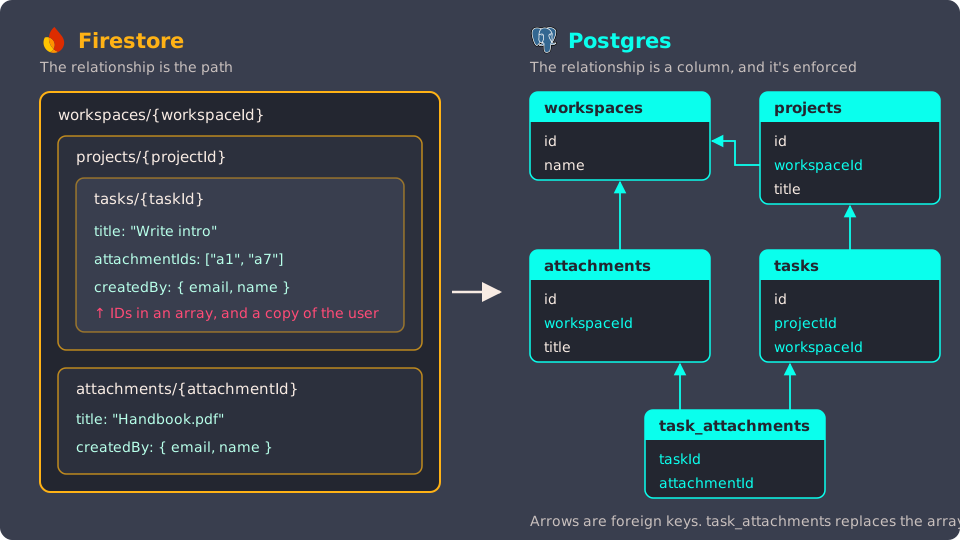
I ended up with five rules. They cover pretty much everything.
Rule 1: A parent in the path becomes a foreign key
In Firestore, a document "belongs" to its parent because of where it lives. Take a task at workspaces/{workspaceId}/projects/{projectId}/tasks/{taskId}: the relationship is the path itself. In Postgres, the path is gone and every parent becomes a column. The task gets a projectId foreign key to the projects table.
I also gave every tenant-owned table its own tenant ID column, even when you could get to the tenant through a parent. Kepp is multi-tenant, and having the tenant on every row makes authorization checks and indexes a lot simpler than joining up the tree every time.
Those foreign keys use onDelete: Cascade, which is what Firestore never gave me. Delete a parent, and its children go with it. No orphans.
Rule 2: Arrays of IDs become junction tables
A lot of Firestore documents held arrays of IDs pointing to other documents. Think of a task with a tagIds array or an attachmentIds array. Sometimes the array held full copies of the other documents instead of just their IDs (more on that below). In Postgres each of those arrays became a junction table, like TaskTag or TaskAttachment. When the array items carried extra data about the link itself, that data became a column on the junction table.
The import script mapped every Firestore ID in those arrays to its new Postgres UUID. When it couldn't find one, it logged a warning: the document pointed to something that didn't exist anymore. That warning fired more often than I'd like to admit. Firestore had been fine with those dead references for years.
Rule 3: Embedded config arrays become their own tables
Some top-level documents held arrays of settings, like the categories or labels a tenant could define. These look like config, but other documents referred to their items by ID. So each list got its own table, linked to the tenant.
On the other hand, two of the top-level collections turned out to be one thing: every tenant had exactly one document in each. A 1-to-1 relationship spread over two documents. In Postgres I merged them into one table.
Rule 4: Keep the old ID next to the new one
Every migrated table has the same two-ID pattern:
model Task {
  id          String  @id @default(uuid()) // new Postgres UUID
  firestoreId String? @unique              // original Firestore document ID
  // ...
}
The migration scripts build an in-memory map of firestoreId → id for every entity, and use it to rewrite references. Because firestoreId is unique, the scripts can upsert on it, which is what makes them safe to run over and over.
I kept the column after the migration. If firestoreId is filled in, the row came from Firestore, which is the first thing you want to know when something looks off. And when a customer reports a broken record, you can look up the original in the Firestore export and compare.
One exception: the user's id is the Supabase Auth UUID, so users.id and auth.users.id are always the same.
Rule 5: Not everything has to be relational
For a version management feature I used savedVersions snapshots. Nobody needs to join on an old version, so they stayed JSON.
Relational doesn't mean everything has to be normalized. Only the relationships you query on need to be real relationships.
4. Security: migrating users without them having to change passwords
Nobody wants to email hundreds of users "Please reset your password because we changed our database". It's bad UX and it looks a lot like phishing.
The good news: Firebase Auth hashes passwords with a modified version of scrypt, and you can export those hashes. I didn't have to figure this out from scratch. These did most of the heavy lifting:
- Supabase's Firebase Auth migration guide
- The community firebase-to-supabase repo, with scripts for auth, Firestore and storage
- The firebase-scrypt package, to verify a password against a Firebase hash
The steps:
- Export the users and their hashes with the Firebase CLI, and copy the hash parameters from the Firebase Console. Treat both as secrets, and delete the export file once the import is done.
- Import them into Supabase Auth, with the Firebase hash stored next to each user. Only import users that still exist in the app, and match emails case-insensitively (Firebase allows mixed-case emails). Only mark an email as confirmed if it was verified in Firebase.
- Verify on first login. If a normal Supabase login fails, the server checks the password against the old Firebase hash. If it matches, it becomes the user's Supabase password and the old hash is deleted.
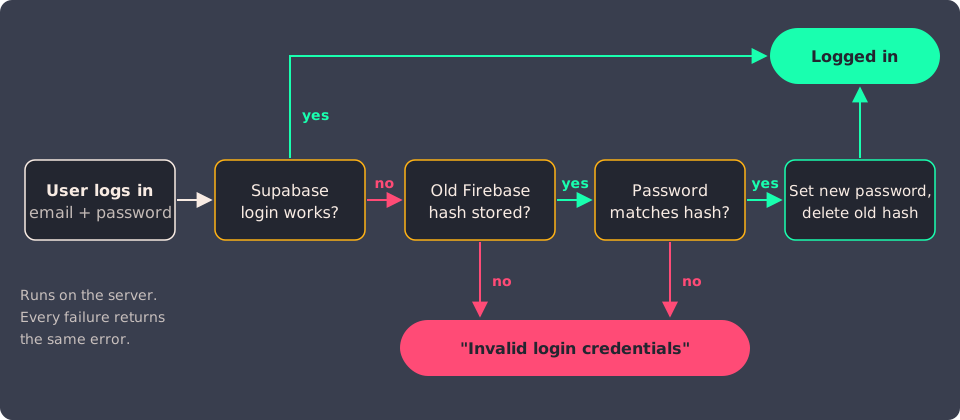
For the user, nothing changed. They typed the same email and password they always did, and they were in. All of this runs on the server, and every failed login returns the same error.
Keep the old hash in app_metadata, or in a table only your server can read. Not in user_metadata: users can change their own user_metadata with updateUser(), and it ends up in every login token. The community scripts do put the whole Firebase user, hash included, in user_metadata. That works, and the risk is low: someone would first need a stolen session, and it only affects users who haven't logged in since the migration. But it's an easy one to avoid.
Looking back, I could have skipped step 3. Supabase Auth verifies Firebase hashes itself if you import them in its $fbscrypt$ format (supabase/auth#1768). The hash then sits in auth.users like any password, so a normal login just works, with no custom route. One thing to know: that format includes the signer key, so every user's row holds a copy of it.
5. The pitfalls
Comparing the old and new app side by side on staging caught these. The first two come from moving schemaless, duplicated data into a database that enforces a schema and relations. Fine in Firestore, a problem in Postgres. The third one is on Supabase.
👎🏼 Timestamps that weren't what they seemed
Firestore timestamps don't come out of an export as plain dates. Depending on the export script, I got { _seconds, _nanoseconds } objects in one file and strings in another. On top of that, older documents simply didn't have some fields, because Firestore doesn't enforce a schema.
And then there was this innocent-looking line, which I had in a few import scripts:
createdAt: file.createdAt ? new Date(file.createdAt) : new Date(),
If a document had no createdAt, it became the date of the migration. Suddenly a document from 2021 looked brand new. Lesson: decide per field what "missing" means, and don't make up a value just to satisfy a NOT NULL constraint.
👎🏼 createdBy pointing to nobody
In Firestore, a document stored a copy of whoever created it: something like createdBy: { email, name }. That's normal in Firestore: you read it without an extra lookup. But it's a copy, not a relation. When a user was deleted, all those copies stayed behind, pointing to nobody. In Firestore that didn't break anything. In Postgres it did.
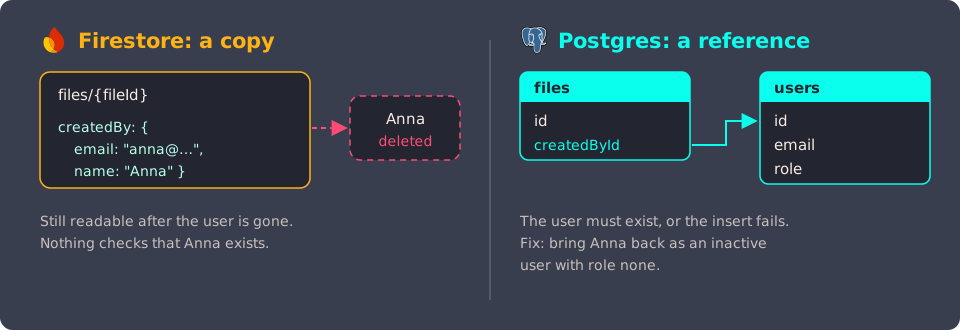
In Postgres, createdById is a foreign key to users, so it has to point to a real user. My first version of the import scripts fell back to a system admin user when the email wasn't found. Which meant lots of records claiming they were created by the admin. Wrong, and confusing for customers.
The fix took a few scripts:
- Collect every
createdByandupdatedByemail from the Firestore export - Find the ones that don't exist in Postgres
- Create inactive users for them (role
none, no access) - Point the foreign keys to those users instead of the admin
There was more of this kind of thing: about 19 improvements with a duplicate number inside the same account (a unique constraint in Postgres, but just a field in Firestore), steps pointing to deleted files, and saved versions referencing Firestore IDs instead of the new UUIDs. None of these caused problems in Firestore. They only became problems once Postgres started enforcing constraints.
👎🏼 Supabase Storage doesn't like the letter ë
Firebase Storage accepted any file name for years. Supabase Storage only accepts a limited set of ASCII characters in object keys, so a file name with an ë fails:
{ "statusCode": "400", "error": "InvalidKey", "message": "Invalid key: financiële rapportage.pdf" }
There's been an open issue about it since 2022. And you only need one user with one special character in one file name to hit it.
In a migration, every file has to come over. So a retry script renamed the rejected files to ASCII (ë → e), kept a mapping of old to new names, and a fix-up script used that mapping to update the file paths in the database. New uploads now go through a sanitizeFilename() helper first.
👍🏼 Do: Scan your storage for file names Supabase will reject before you migrate, and keep the storage key separate from the file name you show the user.
👍🏼 Do: Sanitize your data before you migrate, not after
If I could do one thing over, it would be this. Write the "find all broken references" scripts first, run them against your Firestore export, and fix the source data before you start importing. Postgres will force you to deal with it anyway. Better to deal with it on your own schedule than after a big-bang cutover.
6. What I'd do differently
- Sanitize first. See above.
- Import the hashes in
$fbscrypt$format. See section 4.
The biggest takeaway
Firestore's flexibility is a strength. You can store anything, anywhere, in any shape. The flip side is that the database won't tell you when your data doesn't fit a relational model. Postgres does, loudly, at migration time. So if you're planning a move from Firestore to a relational database: budget more time for cleaning data than for writing the migration scripts.
If you have any questions or are planning a similar migration, feel free to reach out to me!